Recruitment runs smarter with Agentic AI
ExcelHire gives staffing agencies, IT and healthcare recruiters, and RPO teams a crew of AI agents that source, screen and engage candidates, while your recruiters review every decision that matters.
Good morning, Jennifer
Here's what your agents did while you were away
48
Open requirements
126
Submissions this week
37
Interviews scheduled
12
Placements this month
Pipeline this month
Recruitment runs smarter with Agentic AI
ExcelHire gives staffing agencies, IT and healthcare recruiters, and RPO teams a crew of AI agents that source, screen and engage candidates, while your recruiters review every decision that matters.
Good morning, Jennifer
Here's what your agents did while you were away
48
Open requirements
126
Submissions this week
37
Interviews scheduled
12
Placements this month
Pipeline this month
Recruitment runs smarter with Agentic AI
ExcelHire gives staffing agencies, IT and healthcare recruiters, and RPO teams a crew of AI agents that source, screen and engage candidates, while your recruiters review every decision that matters.
AI Sourcing
Matching your resume database to a job description
Recruitment runs smarter with Agentic AI
ExcelHire gives staffing agencies, IT and healthcare recruiters, and RPO teams a crew of AI agents that source, screen and engage candidates, while your recruiters review every decision that matters.
AI Voice Calling
Availability check and pre-screening
Sample candidate
Java Developer · Dallas, TX
Recruitment runs smarter with Agentic AI
ExcelHire gives staffing agencies, IT and healthcare recruiters, and RPO teams a crew of AI agents that source, screen and engage candidates, while your recruiters review every decision that matters.
AI Video Pre-Screening
Recorded answers, typed code and one consolidated AI report
Tell us about yourself
Recruitment runs smarter with Agentic AI
ExcelHire gives staffing agencies, IT and healthcare recruiters, and RPO teams a crew of AI agents that source, screen and engage candidates, while your recruiters review every decision that matters.
HRMS
Onboarding, timesheets and invoices
Onboarding: Sample hire
193 of 230 approved
Sample activity
Give recruiters their day back.
Five tasks quietly consume most of a recruiter's week. Pick one to see how ExcelHire's agents take it on.
Today
Recruiters rebuild the same boolean searches across job boards and the resume database for every new requirement.
With ExcelHire
Candidate Search Agent
Searches your database and talent pools from the job description, skills, titles and locations, then hands back relevant profiles to review.
Give recruiters their day back.
Five tasks quietly consume most of a recruiter's week. Pick one to see how ExcelHire's agents take it on.
Today
Recruiters rebuild the same boolean searches across job boards and the resume database for every new requirement.
With ExcelHire
Candidate Search Agent
Searches your database and talent pools from the job description, skills, titles and locations, then hands back relevant profiles to review.
Give recruiters their day back.
Five tasks quietly consume most of a recruiter's week. Pick one to see how ExcelHire's agents take it on.
Today
Hundreds of resumes land on one requirement and get skimmed in the order they arrived.
With ExcelHire
Analysis Agent
Parses and compares each resume with the requirement so recruiters start with the strongest profiles instead of the newest.
Give recruiters their day back.
Five tasks quietly consume most of a recruiter's week. Pick one to see how ExcelHire's agents take it on.
Today
Availability checks, reminders and status emails eat the hours meant for candidate conversations.
With ExcelHire
Email and Calling Agents
Send follow-ups, check availability by voice and log every response against the candidate record.
Give recruiters their day back.
Five tasks quietly consume most of a recruiter's week. Pick one to see how ExcelHire's agents take it on.
Today
Jobs, candidates, vendors, bench and HR records live in separate tools that never quite agree.
With ExcelHire
One connected platform
ATS, sourcing, bench sales, vendor management and HRMS share the same records, so status updates once.
Give recruiters their day back.
Five tasks quietly consume most of a recruiter's week. Pick one to see how ExcelHire's agents take it on.
Today
Onboarding paperwork, timesheets, invoices and I-9 workflows pull recruiters away from filling roles.
With ExcelHire
HR Agent
Runs onboarding, leave, timesheet, invoice and document-signing workflows from the same system.
Seven AI agents. One recruiter in charge.
Each agent does one job well. Pick one to see what it's working on right now.
Candidate Search Agent
Discovers candidates across platforms
Searches your job boards, resume database and CRM for people who fit the requirement.
Jennifer, your recruiter, reviews the work and makes the final call.
Seven AI agents. One recruiter in charge.
Each agent does one job well. Pick one to see what it's working on right now.
Candidate Search Agent
Discovers candidates across platforms
Searches your job boards, resume database and CRM for people who fit the requirement.
Jennifer, your recruiter, reviews the work and makes the final call.
Seven AI agents. One recruiter in charge.
Each agent does one job well. Pick one to see what it's working on right now.
Email Agent
Automates personalized outreach
Writes and sends personalized messages, and adapts the sequence as candidates reply.
Jennifer, your recruiter, reviews the work and makes the final call.
Seven AI agents. One recruiter in charge.
Each agent does one job well. Pick one to see what it's working on right now.
Monitoring Agent
Tracks engagement and pipeline health
Watches every requirement and alerts your team by Slack or email when candidates drop off or a stage stalls.
Jennifer, your recruiter, reviews the work and makes the final call.
Seven AI agents. One recruiter in charge.
Each agent does one job well. Pick one to see what it's working on right now.
Analysis Agent
Delivers recruitment performance insights
Builds weekly dashboards so recruiters can fine-tune campaigns and outreach strategy.
Jennifer, your recruiter, reviews the work and makes the final call.
Seven AI agents. One recruiter in charge.
Each agent does one job well. Pick one to see what it's working on right now.
Decision Agent
Evaluates and shortlists talent
Scores candidates against evaluation templates configured with your role-specific criteria, then proposes a shortlist.
Jennifer, your recruiter, reviews the work and makes the final call.
Seven AI agents. One recruiter in charge.
Each agent does one job well. Pick one to see what it's working on right now.
HR Agent
Handles scheduling logistics
Coordinates interviews, follow-ups and feedback collection so calendars stop being a bottleneck.
Jennifer, your recruiter, reviews the work and makes the final call.
Seven AI agents. One recruiter in charge.
Each agent does one job well. Pick one to see what it's working on right now.
Calling Agent
Screens candidates by phone
Calls candidates at the scheduled time, checks availability, asks your screening questions and saves the result on the job.
Jennifer, your recruiter, reviews the work and makes the final call.
Hear Tina, ExcelHire Voice, make the call.
Tina calls the candidate, checks availability and asks your screening questions. Every answer is written back for a recruiter to review.
Preview with sample data. Tina's voice is AI-generated. Learn more about ExcelHire Voice
ExcelHire Vision: video pre-screening.
Candidates record their answers on video, and you get one consolidated AI report tied to the job.
Preview with sample data. Tina's voice is AI-generated. Learn more about ExcelHire Vision
Send a document. Get it back signed.
Upload a PDF and send it to the candidate. Once it is signed, the completed copy comes back to the recruiter.
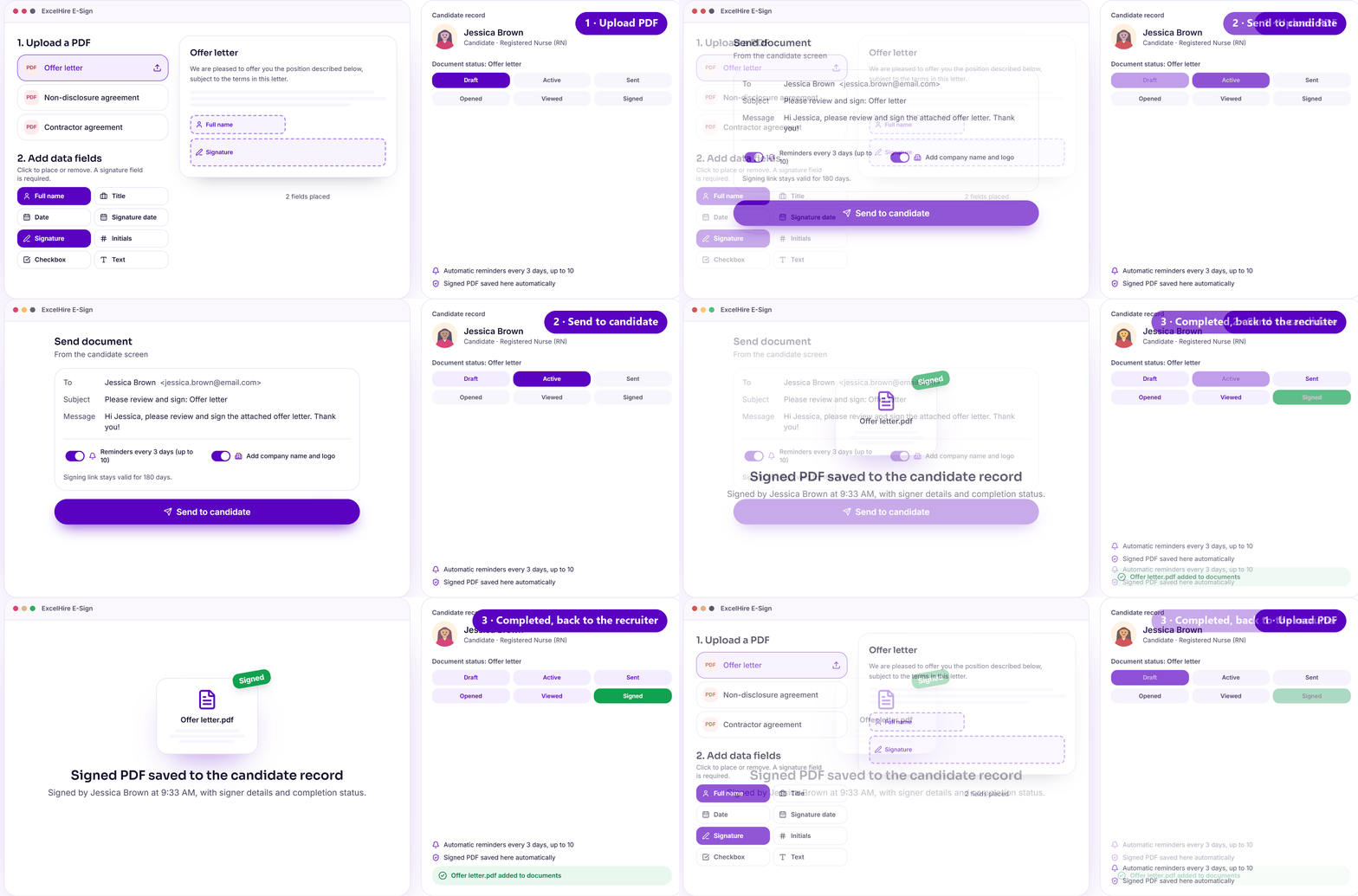
Preview with sample data. Learn more about ExcelHire E-Sign
Like what you've seen so far?
See ExcelHire on your own roles, or estimate what faster hiring is worth to you.
From requirement to submission.
Scroll to follow one requirement through ExcelHire's agents. The orange step is where your recruiter decides.
Step 1 of 6 · Job Management
Job requirement
Requirements are imported from job boards, VMS portals or entered once, with skills, location, rate and client attached.
From requirement to submission.
The orange step is where your recruiter takes the decision.
Job Management
Job requirement
Requirements are imported from job boards, VMS portals or entered once, with skills, location, rate and client attached.
Candidate Search Agent
Candidate discovery
Searches your resume database and talent pools using the job description, skills, titles and locations, and resurfaces past candidates.
Analysis Agent
Screening
Resumes are parsed and compared with the requirement. Voice and video pre-screening add answers recruiters would otherwise chase.
Email and Calling Agents
Engagement
Personalised emails and AI voice calls confirm interest and availability, and every reply is logged on the candidate record.
You, the recruiter
Recruiter review
Nothing goes to a client without a person. Recruiters see why each candidate surfaced and decide who moves forward.
Decision Agent
Submission
Approved candidates are packaged and submitted to the client or vendor, and the pipeline updates for the whole team.
One platform for the whole staffing desk.
Recruiting, sourcing, screening, bench sales, vendor management and HR run on the same records, so an update in one place shows up everywhere.
ExcelHire Sourcing
Toggle the search filters to see how candidates from your own database are matched to a requirement.
ExcelHire ATS
Job requirements, candidate profiles, resume screening, submissions and pipelines in one place.
Sourced
Screened
Submitted
Interview
Resume processing
Bulk resume upload, parsing and AI pre-screening against the requirement.
Bench sales
Manage bench candidates, match them to open opportunities and track submissions.
One platform for the whole staffing desk.
Recruiting, sourcing, screening, bench sales, vendor management and HR run on the same records, so an update in one place shows up everywhere.
ExcelHire Sourcing
Toggle the search filters to see how candidates from your own database are matched to a requirement.
ExcelHire ATS
Job requirements, candidate profiles, resume screening, submissions and pipelines in one place.
Sourced
Screened
Submitted
Interview
Resume processing
Bulk resume upload, parsing and AI pre-screening against the requirement.
Bench sales
Manage bench candidates, match them to open opportunities and track submissions.
One platform for the whole staffing desk.
Recruiting, sourcing, screening, bench sales, vendor management and HR run on the same records, so an update in one place shows up everywhere.
ExcelHire Sourcing
Toggle the search filters to see how candidates from your own database are matched to a requirement.
ExcelHire ATS
Job requirements, candidate profiles, resume screening, submissions and pipelines in one place.
Sourced
Screened
Submitted
Interview
Resume processing
Bulk resume upload, parsing and AI pre-screening against the requirement.
Bench sales
Manage bench candidates, match them to open opportunities and track submissions.
One platform for the whole staffing desk.
Recruiting, sourcing, screening, bench sales, vendor management and HR run on the same records, so an update in one place shows up everywhere.
ExcelHire Sourcing
Toggle the search filters to see how candidates from your own database are matched to a requirement.
ExcelHire ATS
Job requirements, candidate profiles, resume screening, submissions and pipelines in one place.
Sourced
Screened
Submitted
Interview
Resume processing
Bulk resume upload, parsing and AI pre-screening against the requirement.
Bench sales
Manage bench candidates, match them to open opportunities and track submissions.
One platform for the whole staffing desk.
Recruiting, sourcing, screening, bench sales, vendor management and HR run on the same records, so an update in one place shows up everywhere.
ExcelHire Sourcing
Toggle the search filters to see how candidates from your own database are matched to a requirement.
ExcelHire ATS
Job requirements, candidate profiles, resume screening, submissions and pipelines in one place.
Sourced
Screened
Submitted
Interview
Resume processing
Bulk resume upload, parsing and AI pre-screening against the requirement.
Bench sales
Manage bench candidates, match them to open opportunities and track submissions.
One platform for the whole staffing desk.
Recruiting, sourcing, screening, bench sales, vendor management and HR run on the same records, so an update in one place shows up everywhere.
ExcelHire Sourcing
Toggle the search filters to see how candidates from your own database are matched to a requirement.
ExcelHire ATS
Job requirements, candidate profiles, resume screening, submissions and pipelines in one place.
Sourced
Screened
Submitted
Interview
Resume processing
Bulk resume upload, parsing and AI pre-screening against the requirement.
Bench sales
Manage bench candidates, match them to open opportunities and track submissions.
Six products, one hiring record.
Each ExcelHire product works on its own and gets better together, because they share the same candidates, jobs and history.
The system of record: requirements, candidates, resume screening, submissions and pipelines.
Six products, one hiring record.
Each ExcelHire product works on its own and gets better together, because they share the same candidates, jobs and history.
The system of record: requirements, candidates, resume screening, submissions and pipelines.
Six products, one hiring record.
Each ExcelHire product works on its own and gets better together, because they share the same candidates, jobs and history.
AI candidate discovery and job matching across your resume database and talent pools.
Six products, one hiring record.
Each ExcelHire product works on its own and gets better together, because they share the same candidates, jobs and history.
AI voice calling for candidate availability checks and voice-based pre-screening.
Six products, one hiring record.
Each ExcelHire product works on its own and gets better together, because they share the same candidates, jobs and history.
Six products, one hiring record.
Each ExcelHire product works on its own and gets better together, because they share the same candidates, jobs and history.
Digital document-signing workflows for offers, contracts and onboarding paperwork.
Six products, one hiring record.
Each ExcelHire product works on its own and gets better together, because they share the same candidates, jobs and history.
Employee onboarding, leave requests, timesheets, invoices and I-9 compliance workflows.
Built for how staffing works.
Win IT requirements on speed.
IT staffing moves on speed to submission. ExcelHire searches your database by skills and job description, checks availability by voice and keeps bench consultants matched to new requirements.
Built for how staffing works.
Win IT requirements on speed.
IT staffing moves on speed to submission. ExcelHire searches your database by skills and job description, checks availability by voice and keeps bench consultants matched to new requirements.
Built for how staffing works.
Keep clinicians engaged to day one.
Healthcare recruiters juggle licenses, shifts and start dates across many open needs. Voice pre-screening captures those answers early, and onboarding paperwork runs in the same platform.
Built for how staffing works.
Give every recruiter a team of AI agents.
Agencies grow by placing more candidates per recruiter. ExcelHire takes on sourcing, screening and follow-ups so recruiters spend their time with candidates and clients.
Built for how staffing works.
Every client program, one workspace.
RPO teams need consistent screening across clients and clear visibility for each program. ExcelHire keeps requirements, pipelines and reporting organised by client.
AI that works for your recruiters.
Recruiters stay in control
Agents prepare the work. People approve shortlists and submissions.
Every action is visible
Agent activity is logged on the candidate and job record for your team to review.
Fits your existing channels
Jobs come in from job boards and VMS portals, and go back out to them, from one dashboard.
Post jobs to major job boards in one step
Questions staffing leaders ask us.
What is ExcelHire?
ExcelHire is an Agentic AI Recruitment OS that automates the hiring process from sourcing candidates to onboarding, using intelligent AI agents.
How is ExcelHire different from a traditional ATS?
Traditional ATS systems only track applicants. ExcelHire actively executes hiring workflows using AI: searching candidates, engaging them, screening, and moving them through pipelines.
What is Agentic AI in hiring?
Agentic AI refers to systems that can independently take actions and make decisions. In ExcelHire, AI agents handle sourcing, outreach, screening and pipeline updates without manual effort.
What tasks does ExcelHire automate?
Candidate sourcing across multiple channels, personalised email outreach and follow-ups, AI voice screening calls, AI video interviews and scoring, and candidate ranking and pipeline movement.
Will ExcelHire replace recruiters?
No. ExcelHire removes repetitive work so recruiters can focus on high-value activities like candidate relationships, decision-making and closing hires.
How does AI candidate sourcing work?
ExcelHire's AI scans internal databases, job boards and talent pools to identify and match high-fit candidates using context-aware matching.
Does ExcelHire support end-to-end hiring?
Yes: sourcing, outreach, screening, interview, selection and onboarding.
Guides for staffing teams.
Blog ·
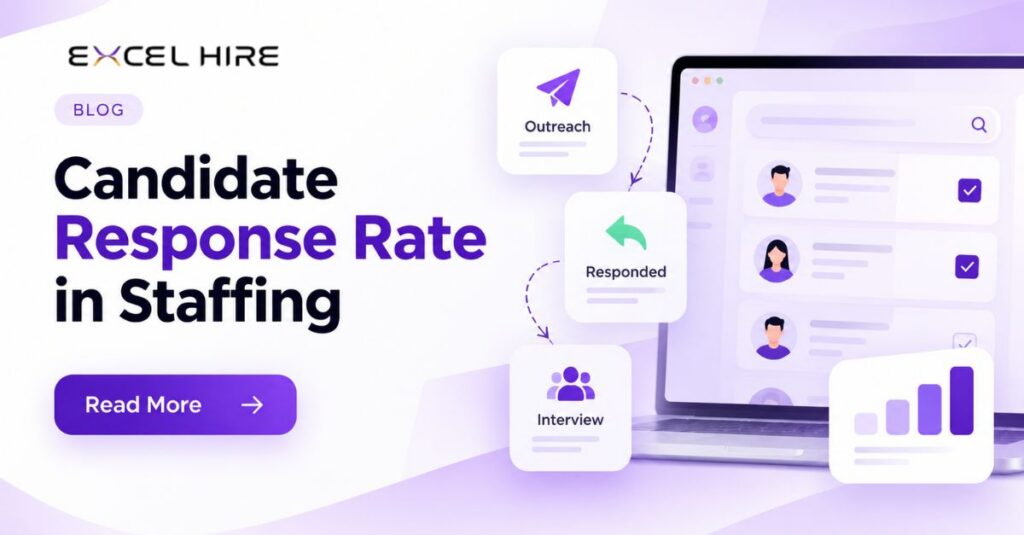
Candidate Response Rate in Staffing: What to Measure After Outreach
Candidate Response Rate in Staffing: What Should Recruiters Measure After Outreach? You sent 100 messages to candidates. But how many replied? How many were interested in the job? And how many actually moved to the next step? That’s where many staffing recruiters face a problem. Sending messages is easy. Getting the right candidates to respond is the real challenge. Candidate response rate helps recruiters understand whether their outreach is working. But counting replies alone isn’t enough. You also need to know how many candidates are interested, available, and ready to move forward. Let’s look at the numbers that really matter. What Is Candidate Response Rate? Candidate response rate tells you how many candidates reply after you contact them about a job opportunity. Formula: Candidate Response Rate = (Candidates Who Replied ÷ Candidates Contacted) × 100 For example, if you contact 100 candidates and 25 reply, your response rate is 25%. Simple, right? But here’s the important part: those 25 replies don’t necessarily mean 25 potential placements. Some candidates may not be interested, some may be unavailable, and others may not match the job requirements. That’s why recruiters need to look beyond the first reply. 5 Metrics Every Staffing Recruiter Should Track 1. Candidate Response Rate How many candidates are replying to your messages? If your response rate is low, check whether you’re contacting the right candidates. Your message, job requirements, and timing can also affect the results. Don’t immediately send more messages. First, understand why candidates aren’t responding. 2. Positive Response Rate Getting a reply is one thing. Finding a candidate who is interested is another. For example, 100 candidates receive your message. Twenty reply, but only eight want to discuss the opportunity. Your overall response rate is 20%, while your positive response rate is 8% of the candidates contacted. This tells you much more about the quality of your outreach. 3. Time to First Response How long does it take candidates to respond? Tracking response time helps recruiters understand how quickly conversations are starting and when a follow-up might be useful. Compare results across different roles and outreach channels rather than assuming every candidate will respond at the same speed. 4. Follow-Up Response Rate How many candidates respond after your follow-up message? Recruiters often manage multiple job openings, candidate lists, and client deadlines. It’s easy for follow-ups to get missed. Track which follow-ups generate replies and make sure every interested candidate has a clear next step. Always respect candidates who decline or ask you to stop contacting them. 5. Candidate Submission Rate This is where the numbers become more meaningful for staffing agencies. How many candidates you contact eventually reach the client submission stage? Suppose you contact 100 candidates, 20 reply, and five are submitted to clients. Your candidate-to-submission rate is 5%. This helps you understand whether your outreach is producing candidates who can actually move forward in the recruitment process. Why Do Candidates Ignore Recruiter Messages? Sometimes the problem isn’t the number of messages you send. It’s the way you approach candidates. Here are a few common reasons: Irrelevant opportunities: The job doesn’t match the candidate’s skills or preferences. Generic messages: The candidate can’t see why the opportunity is relevant to them. Outdated contact details: Your message never reaches the right person. Poor follow-up management: Interested candidates don’t hear back at the right time. Slow screening: Candidates lose interest while waiting for the next step. Duplicate outreach: Multiple recruiters contact the same candidate without coordination. Before increasing outreach volume, identify which of these problems affects your recruitment process. How Can Recruiters Improve Candidate Response Rates? You don’t always need to contact more candidates. Sometimes, you need to manage your existing outreach better. Make your messages relevant. Explain why the role could be a good fit instead of sending the same generic message to everyone. Keep candidate information updated. Accurate contact details and organized records help reduce wasted outreach. Follow up consistently. Keep track of who was contacted, who replied, and who needs a follow-up. Check availability early. For IT and healthcare staffing, confirming interest and relevant availability can help recruiters avoid spending time on unsuitable opportunities. Measure what happens next. Don’t stop at replies. Track screenings, submissions, and interviews to understand which outreach efforts produce useful results. Small improvements across these steps can make your recruitment workflow more organized and effective. How ExcelHire Helps Recruiters Manage Outreach Imagine managing candidate sourcing, outreach, availability checks, and screening without constantly switching between disconnected tools. That’s the kind of recruitment workflow ExcelHire is designed to support. ExcelHire brings AI-powered sourcing and recruitment workflows together, helping staffing teams: Find relevant candidates through AI-powered sourcing. Organize candidate information and reduce duplicate records. Manage recruitment communication and follow-up activities. Use AI Voice capabilities to support candidate calls and availability checks. Use AI Video capabilities for structured candidate pre-screening. Track candidates as they move through the recruitment pipeline. For US IT and healthcare staffing agencies, these capabilities can help connect the steps between finding a candidate and preparing them for client consideration. Your response rate still depends on factors such as job relevance, candidate data quality, and outreach practices. The goal is to make the process easier to manage and measure. Candidate response rate is more than a number on a recruitment dashboard. It helps you understand whether your messages are reaching candidates and starting conversations. But the bigger question is what happens after they reply. Are they interested? Are they available? Are they completing screening? Are they reaching the client? Stop measuring outreach only by the number of messages sent. Start measuring how many candidates move forward. With ExcelHire, staffing teams can bring sourcing, communication, and screening into a more connected recruitment workflow. Explore ExcelHire: https://excelhire.us/ FAQs What is a good candidate response rate? There is no single response rate that works for every staffing campaign. It depends on the role, candidate audience, communication channel, and message relevance. Compare similar campaigns to understand your own performance. How do recruiters calculate candidate response rate?

Case study ·
Mass Action on Candidates Across Pipeline

White paper ·
Staffing Automation 2025 – How Agentic AI Transforms Agencies
Staffing Automation 2025 – How Agentic AI Transforms Agencies
See it on your own roles.
In a 30-minute demo we'll run ExcelHire on roles like yours and show where recruiters stay in control.